




Your own domain
Put your business address at the centre of your daily work. Give your team a system that belongs under your own brand.
Built for how African payment-on-delivery (POD) e-commerce works. Buy and own Qartmax on your domain and hosting, customize it around your business, and let our team handle maintenance and management.
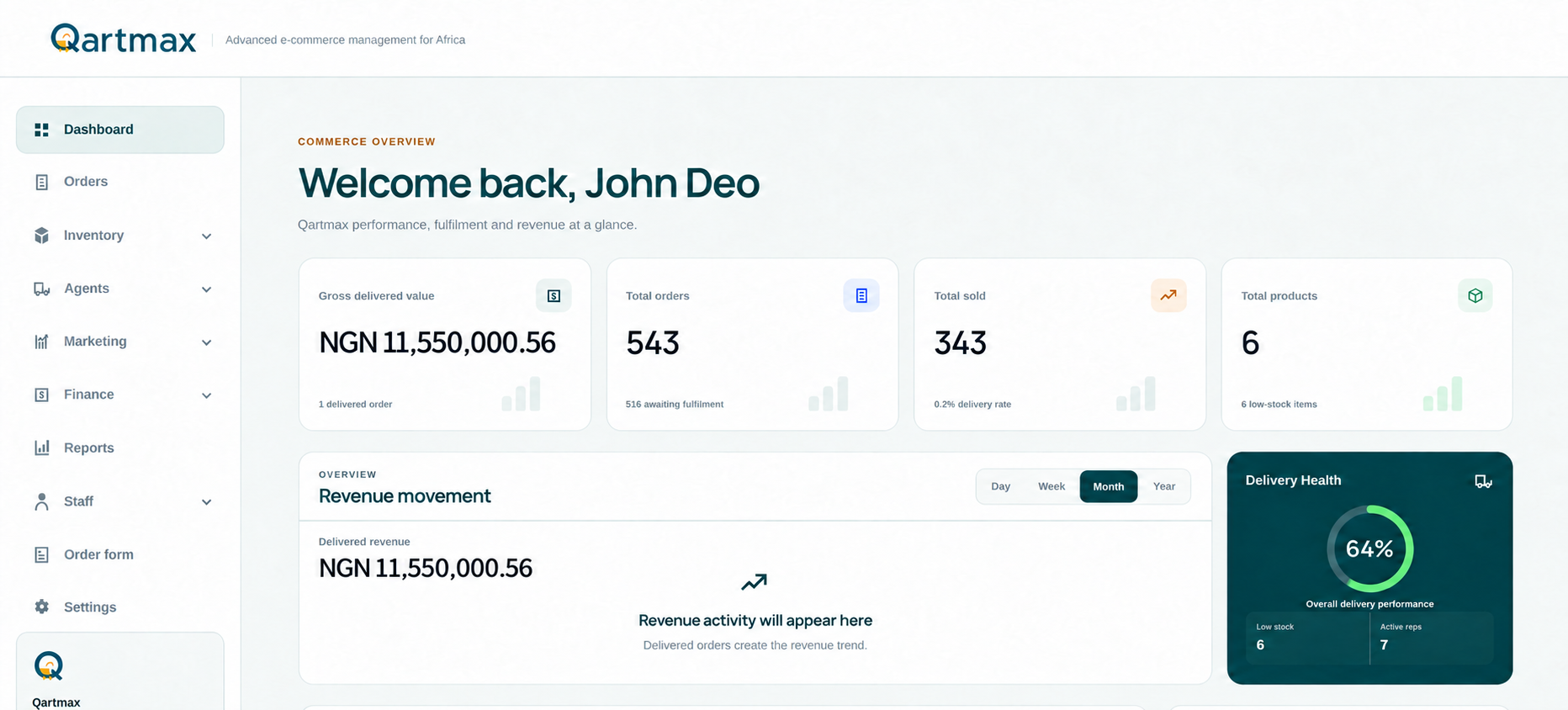
From the first order to the final payment, keep the whole team connected.
Pay and own your software
Qartmax is software you purchase for your business. You get your own installation, the freedom to self-host and the option to tailor it to the way your team actually works.
Put your business address at the centre of your daily work. Give your team a system that belongs under your own brand.
Run your own Qartmax installation on your hosting. Have a direct say in where your business records are hosted and who can access them.
Need different order stages, staff processes or reports? Tell us how your business operates and we can scope the changes to fit.
Ownership comes with a team behind you. We provide maintenance and management under the service arrangement agreed for your setup.
Own the system. Keep expert help close.
Plan my Qartmax setupHow it works
We work with you to agree the setup, prepare your own installation and support it as your team gets to work.
Tell us about your products, sales staff, delivery agents and daily processes. We identify the setup and customizations your business needs.
Review a proposal covering your software purchase, setup, requested changes and the maintenance and management arrangement.
We prepare Qartmax on your domain and hosting, with the agreed configuration for your products, team and workflows.
Your team runs the daily operation. Our team handles the maintenance and management agreed for your installation, and you can discuss further changes as your business grows.
Want to see how this fits your business?
Talk us through your workflowLess chasing. More control.
Which staff member is following up? How much stock is with the agent? Has the delivery money come in? When the answers are scattered across chats and spreadsheets, checking on your business becomes another job.
Qartmax keeps those answers alongside your orders. Your team updates the work in one place, so you can see what needs attention without asking everyone for a separate report.
Complete platform
Manage your store, sales team, delivery agents, stock and finances from the same workspace.
Give customers a place to shop, with products and orders connected to your team.
See what you can doKeep your products, prices, categories and offers organized in one catalogue.
See what you can doFind an order, assign the work, follow up with the customer and track its progress.
See what you can doChoose what each staff member can see and do, and keep order ownership clear.
See what you can doSee agent assignments, stock, deliveries and the payments still owed to your business.
See what you can doKnow what stock you have, where it is held and how it moves between locations.
See what you can doLet customers choose an offer and send their details straight into your order workspace.
See what you can doSee which campaigns bring in orders and deliveries, and compare the results with ad spend.
See what you can doKeep income, expenses, delivery charges and order settlements connected.
See what you can doCheck sales, delivery, team and campaign performance using the records you already keep.
See what you can doQartmax storefront
Give customers a place to browse and order. Behind the scenes, your team works with the same products, prices and orders in Qartmax.
Make the software fit the business
The way you assign orders, follow up with customers, manage agents and approve payments is part of what makes your business work. Qartmax can be customized around those processes.
Discuss my customizationsWe review your requirements and agree the scope and cost before making the changes.
Order operations
Find the customer, check who owns the order, read the notes and see the next step. Your team can follow up and update progress without searching through old messages.
Automated workflow
Set up eligible staff and let Qartmax assign incoming orders. You can see who is responsible for each customer and your team can get on with the follow-up.
No more asking who is handling the order.
Team operations
Sales staff need orders to follow up. Delivery agents need clear assignments. You decide which pages and actions each person can use.
Staff
Give staff access to the orders and tools they need. Keep follow-up notes and order progress together, and review staff performance in Reports.
Delivery agents
See the orders and stock assigned to each agent, what has been delivered and which payments are still outstanding.
Accountability
Choose who can change, delete or confirm important records. Staff can do their daily work while you keep control of sensitive financial actions.
Marketing intelligence
Follow a campaign from ad spend to customer order to delivery. See what it brings into the business and use those results to decide where your next budget should go.
Sales Forms
Create a Sales Form for your product or package. Customers choose an offer and enter their details, while your team receives an order linked to the product and its source.
Use a mobile-friendly Sales Form for your offer or embed it on an existing page. Orders feed into the same workspace your team uses every day.
Inventory control
Check what is in the office, what is with each agent and what has moved. Purchases, transfers and damaged stock stay linked to the product, so changes are easier to trace.
Potential stock profit is not recorded revenue. It is the difference between current stock selling value and cost value.
Finance
Track sales income alongside stock purchases, delivery charges and ad spend. Check which delivered orders have been paid over and which still need settlement.
A delivered order and money received are two different steps. Keep track of both.
Connected e-commerce journey
As an order moves through the business, keep its customer, staff member, delivery agent, stock and payment records together.
The next person can pick up the work without starting from scratch.
Why Qartmax
The customer-facing store and the operations behind it belong to the same platform.
Orders connect customers, products, staff, agents, attribution, fulfilment and Finance.
Campaigns connect to generated orders, Delivered conversions and Delivered revenue.
Stock stays linked to products, purchases, offices, agents, transfers and losses.
Supported operational events create linked financial records instead of duplicate entries.
The same authoritative data drives operational pages and reports.
Built to grow
Search for the orders you need, narrow a report by date and open the details when you need them. Qartmax loads focused results so your team can keep working as your records grow.
Controlled operations
Built for real operations
Manage your store, catalogue, orders, fulfilment, staff and performance from one platform.
Send advertising traffic into Sales Forms and track what happens after a lead becomes an order.
Distribute orders, control staff access and maintain ownership across a growing operation.
Follow an order through delivery, track stock with agents and check that collected payments are settled.
Give employees structured access without handing everyone full control of the business.
See how your ad spend connects to customer orders, successful deliveries and delivered revenue.
A closer look
Choose an area below to see the tools available to your team.
Imagine Monday morning with Qartmax
Your sales team checks the orders that need a call. You can see who is handling each customer, what stock is with your agents and which deliveries still need payment. Campaign results and expenses are there too. Everyone works from the same records, so you spend less time asking for updates.
Less time collecting updates. More time moving the business forward.Frequently asked questions
Here are the basics. If your business works a little differently, tell us what you need.
Ask us a questionYes. Qartmax is a pay-and-own offering for your business, with your own installation. Our team also provides maintenance and management. Your proposal sets out the purchase, setup and service arrangement.
Yes. Qartmax can run on your own domain and hosting. We review the hosting requirements with you and agree the deployment setup before launch.
Yes. Tell us about the workflows, branding, reports or other changes you need. We review feasibility and agree the scope, cost and delivery plan for your customizations.
Your own installation gives you control over where the system is hosted and which staff can access your business records. We agree the access our team needs to maintain and manage your setup.
The software purchase and its ongoing operation are different parts of the proposal. Hosting, domain renewals, maintenance, management and future customizations are discussed clearly so you know what your arrangement covers.
Your storefront, products, Sales Forms, orders, staff, delivery agents, stock, campaigns and finances. The records stay connected, so your team can follow the work from an incoming order to delivery and settlement.
Yes. You can track order progress, assign delivery agents, record stock movements and check settlements. This helps you see which orders were delivered and which payments still need to be paid over to the business.
Qartmax supports automatic assignment to eligible staff. Set up the staff who should receive orders, then keep track of ownership and follow-up in the order workspace.
You can embed a Qartmax Sales Form on an existing page. Qartmax also has its own storefront and product pages. Ask us to review your current website if you need a particular connection or integration.
Yes. Qartmax keeps records for office stock, agent stock, waybills, transfers and faulty stock. You can check where products are held and trace the movements behind a stock balance.
Yes. You can control which pages and actions staff can use. This lets you give people the tools for their role while keeping sensitive customer and financial actions restricted.
Campaign Tracking links campaigns and Sales Forms to spend, orders and delivered results. You can compare costs, delivery rates and delivered revenue, with ROI and return-on-ad-spend reporting.
The Pricing page explains what goes into your proposal. Share your team size, hosting plans and the way you handle sales and deliveries so we can scope your own setup.
See purchase and service detailsOwn your software. Shape your future.
Your domain. Your hosting. A system shaped around your team. Tell us how your business works and get a proposal for your own Qartmax software, with maintenance and management from our team.